

The Roller Coaster vs. The Tire Swing

Funny Cartoon

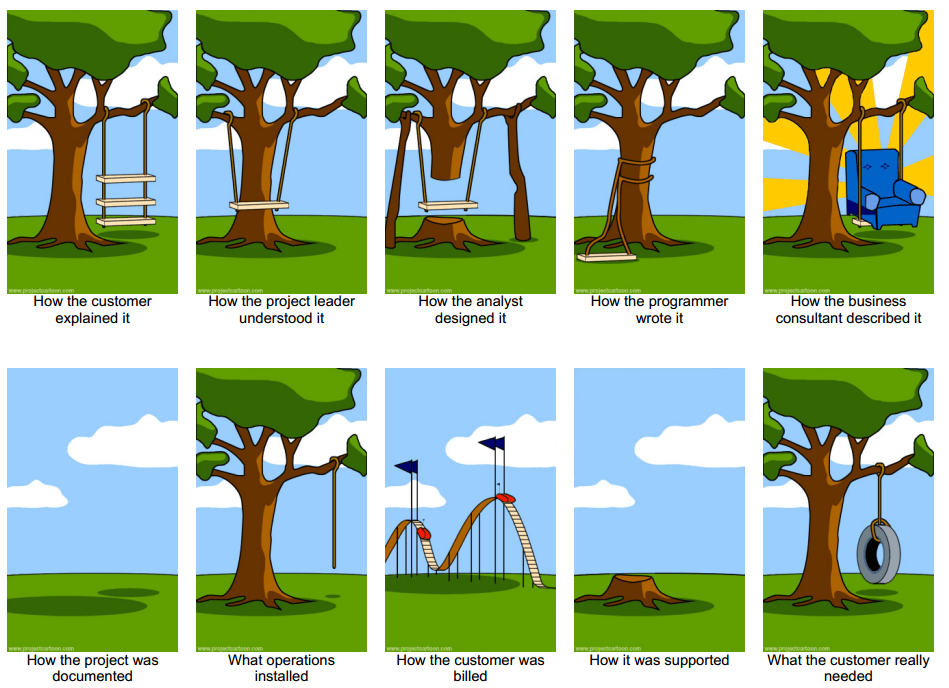
Have you seen this comic or a similar one? It goes a long way to explain the reality of what can easily happen during a project if everyone on the team is not careful to keep working together and keep the end goal in sight. While you can talk at length about how to make sure this doesn’t happen, lets focus on just two of the panels. The roller coaster and the tire swing.

Starting a new software project can be a challenge for many different reasons – you need the right people for the job, you have to know the technology you want to use, and you have to determine whether there are any geographical issues that need to be dealt with (i.e. multiple people in multiple locations).

But one of the most challenging problems can be determining what your client actually needs and filtering out all the stuff that they think they want. And, once you figure that out, keeping everyone on the team – including your client – on track.

Many times when you (as a Project Manager) start a new software project, you will get a long description of all the features required for the new software. And when discussing things further with your client you will find them talking about different screens, interfaces, reports, cool graphics, mobile and the ability to do this and to do that…the list goes on and on and on.

Theses “wants” are what you need to siphon through to get to root of the problem that needs to be solved and to identify any other constraints that will impact the project, like specific technology or architecture limitations. I have to admit, sometimes it is difficult not to get caught up in the ideas of what can be done and how awesome a solution your team can create for your client, but in the end, you have to remember – what you are building is for your client, and you have to figure out what you need to deliver given the amount of money and time your client is willing to invest.

Now that you think you know what your client is looking for – a piece of rope tied to a tree, holding up a used car tire – and understand basically what the problem is and you have formed your project team with the best minds in your organization, and everyone on the team is on board with time and budget and other constraints, and everyone understands what they need to do you can sit back and wait for the final delivery, right? Well, not quite.

Your project team is made up of people.  And not just any kind of people – these are intelligent, creative people who have ideas and thoughts of their own about screens, interfaces, reports, cool graphics, mobile and the ability to do this and to do that…the list goes on and on and on. Sound familiar?

It is very easy when working on projects to get caught up in the ‘what we can do’ vs. ‘what we need to do’. In some cases this is just a matter of managing scope creep, but I think there is another level, that is a lot harder to reign in. This is about the implementation. Everyone needs to remind themselves when thinking about implementation that it is easy to start thinking about a roller coaster solution instead of a simple tire swing. The roller coaster solution is awesome, it’s uses current technology, it’s different from what you have been doing, it’s an opportunity to learn…but it’s not a tire swing. If you had an unlimited amount of time and money, and your client actually wanted a roller coaster, it would be possible to build anything that your mind could imagine. The unfortunate reality is that this is rarely ever the case for software development projects.

What would happen if you built a roller coaster when your client only wanted a tire swing?  Hopefully you never find yourself in that situation.
Implementation of SharePoint Foundations 2010

Document management issues seem to be a common problem in organizations. Anyone working in smaller businesses are likely to be familiar with the “shared drive” and the related management and security issues inherent to this type of document management solution. As a business grows, so does the requirement for a solution to accurately secure and keep track of comment modification and versioning in a user friendly manner that also provides a common interface to make this task easier for new and existing employees.

After looking at options for content and document management, MERAK decided to implement SharePoint Foundations 2010 as it allowed the functionality that we were looking for that integrated with other Microsoft products already in use. While looking at the restrictions involved with using the Foundations version of SharePoint and testing of the default install as packaged by Microsoft, there are a few major limitations with the Microsoft packaged Foundations installation. The limitations that we considered to be important were the following:

  1. The Microsoft installer includes MS SQL 2008. This allows for a maximum database size of 4GB.
  2. The search functionality of SharePoint Foundations is pretty weak by default.

These limitations were enough to start looking for possible solutions to increase the size and search functionality of our new SharePoint server. As well, a little research into Microsoft best practices for the installation of Foundations using domain user accounts led us to start over from scratch with a new virtual machine. We chose to run our SharePoint Foundations server as a single server setup that contains both application server and database. This server is also a virtual machine, so it is best practice to make sure all installed drives for the VM are not a dynamic vhd. Due to the amount of disk activity, static vhd configuration is recommended.

Luckily, there are workarounds to increase the size of the database allowed as well as a much needed improvement in the search functionality.

To lift the database size limit, the best option is to install MS SQL Server 2008 R2 Express on the server before you install SharePoint Foundations. If SQL Server is already present on the machine before the SharePoint install, it will allow you to use the larger database size limit allowed by SQL 2008 R2. This will allow your SharePoint database size to be 10GB which is a much more reasonable limit if you have lots of content to add but have no idea of what size of database will be required. In our case, it made sense to take the increased database limit. To this date, there were no Microsoft SharePoint Foundation downloads that include SQL 2008 R2… you must install by the method above.

At this point the installation of SharePoint Foundations can take place. You will be able to use your SQL 2008 R2 installation for the SharePoint installation. Make sure that the SharePoint 2010 Products Configuration Wizard is run after the install is complete. At this point, the SharePoint 2010 Products Configuration Wizard will need to be run after every installation that affects SharePoint; including the installation of SharePoint 2010 Service Pack 1 which can be installed after the SharePoint Foundations installation has completed and the SharePoint 2010 Products Configuration Wizard has been run.

To allow for an improved search experience, including context based searches in SharePoint Foundations 2010, you can all install Microsoft Search Server 2010 Express. You can run Search Server 2010 Express on the SharePoint server. After installation, it is required again to run the SharePoint 2010 Products Configuration Wizard. Then the new search functionality can be configured from within the SharePoint Management Console.

Once your SharePoint installation is complete, you have one more option to increase the size of the database from 10GB maximum to 16GB maximum by taking advantage of Remote Blob Storage (RBS) which is a feature in SQL Server 2008 R2. It gives you the option of remotely storing larger documents in a blob file referenced by the database instead of leaving them in the database. You have the option to add this store back to the SharePoint database at any time.

After some research and testing, we found SharePoint Foundation 2010 offers a great opportunity for a small business to take advantage of the features in SharePoint. While for some organizations the limitations may warrant looking into the full version, we have found that most of those limitations were palatable in wake of implementing the alternative configurations outlined above.

Judging Capstone Projects

Today was an important day for Conestoga College students in the Computer Programmer (CP), Computer Programmer Analyst (CPA), and Computer Applications Development (CAD) programs. Students were given a task in their first semesters to develop an IT solution that would solve a business problem. They are now given the opportunity to showcase their innovation, skills and creativity to a number of alumni judges.

As a proud support of Conestoga College and its students, we would like to wish you the best of luck and we will look forward to seeing the final projects and winners Tuesday April 30th at the Conestoga Tech@Work event.

Good Luck Students.

SharePoint: Folder vs. Metadata

The debate about folders vs. metadata within SharePoint has been going on for some time. For many of us with IT backgrounds, the choice seems obvious. When it comes to searching, sorting, filtering and categorizing data, metadata comes out as the clear winner. Folders seem almost primitive, with many limitations. That said, why does it seem to be so difficult for end users to jump on board with metadata? Why the resistance to move from the primitive world of folders to the flexible new world of metadata?

Reasons to use metadata within SharePoint:

  1. Metadata allows a user to create views and pull together a list of documents that is specific to that user’s needs
  2. Metadata allows for sorting and filtering specific to the user’s needs
  3. Metadata can be configured to have default values based on content type to simplify document classification
  4. Metadata allows for library configuration that enforces consistent document classification
  5. Consistent metadata across documents within a library will help improve the user’s search results

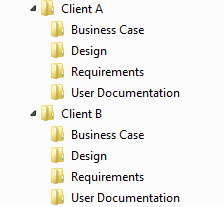
To help illustrate the difference between folders and metadata, consider the following scenario. You have a set of Word documents that are related to one of your clients: Client A. Within this set of files, there are business case documents, requirements documents, design documents and end user documents. Traditionally, you may have created a folder called Client A, and created sub folders for Business Case, Requirements, Design, User Documentation. Then, for Client B, you would create the same set of sub folders:

Gif Of A Folder Structure

This is an intuitive folder structure that would be familiar to most end users. You can easily navigate to the Requirements documents for Client B by first opening the Client B folder, and then opening the Requirements sub folder.

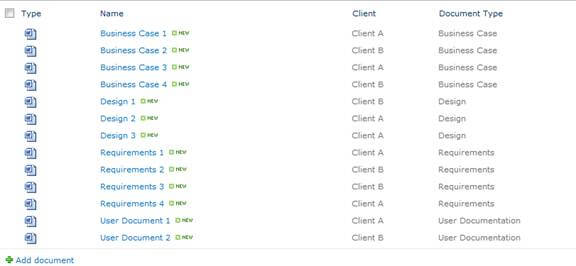
The same categorization can be accomplished using metadata by adding a column for Client and a column for Document Type. The Client column would be a Choice column containing values for Client A and for Client B. The Document Type column would also be a Choice column, containing values for Business Case, Design, Requirements and User Documentation. Each document in the library would then be tied to a specific Client and to a specific Document Type. The result would look as follows:

Screenshot Of Business Cases

With metadata, you can then use the column headers to filter to see all of the Requirements documents for Client A:

Design List
Requirements List

With metadata, you have options that aren’t easily available with folders. For example, you can set a single document to be related to multiple clients:

Design List

To do this with folders, the document would have to be duplicated and copies placed within folders for Client A and for Client B.

There are some good technical reasons for using folders within SharePoint, but I won’t go into those in this article. For the end user however, it would seem that the arguments in favour of using metadata over user folders would be persuasive. And yet, many users are reluctant to make the leap. Why is this? Usually it is because users are comfortable with folders. Folders have been the main method for categorizing documents for as long as most users can remember. Until recently, there wasn’t really much of an option. If you wanted to organize your files, folders was the way to do it. Folders have become the “natural” way to organize files, and it is so ingrained that this is how most people think about organizing their files.

With that in mind, it can be a challenge to convince end users that it is worthwhile to embrace the metadata way of organizing their data. Once shown the advantages, many users will jump on board while others will take longer to see the benefits. It often becomes part of the IT team’s job to “sell” the advantages of using metadata. Because SharePoint supports both metadata and folders, there are options available for easing the transition – although given the choice; many users will opt to continue using folders over metadata. It may be better to remove the folder option, and put some extra effort into training and demonstrating the benefits of using metadata over folders. It will take some time, but in the end most users will come to appreciate the benefits that metadata provides.

For some related articles, please see the following:

Automated Testing: Agile Strategies

Automated testing is a valuable tool that can provide a great return on investment if used effectively. At MERAK, there are several strategies we use with our Agile projects:

Plan from the start

Plan for Automation at the story estimation stage. This stage helps identify what should be automated, whether there will be smoke testing of builds, and if regression, load/stress tests are necessary. When these important pieces of the puzzle are known from the start, unexpected delays can be avoided and appropriate testing time can be allocated. We recommend 10 to 20% of testers’ time be allocated for automated testing in each sprint.

Incremental scripts

When creating an automated test, a tester may only focus on the story being tested and not consider any other stories or sprints. Although it’s not always possible, automated tests can often follow an Agile approach where the Automated Test scripts  are built incrementally similar to the application under test. The result is that at the end of the sprint cycles, you have a fully formed Automated test that assesses the fully-formed application.

Final decision

The final decision to automate should be at the sprint stage. It may not be until a tester writes test cases that it is clear that a user story is a good candidate for automation. Conversely there could be hidden complexity that is too difficult or time consuming to automate.

Standard Automation

Although the iterative development appears to be modular, quite often the code base is common across multiple sprints so regression testing is important and automating it becomes almost standard activity. Multiple sprints also mean multiple runs of the automated script which quickly provides a return on the investment and quite often, the smoke test may also use automated regression tests from the previous sprint. With a new build every three weeks in Agile development (or more, if fixes are deployed in a sprint), developing an automated smoke test  is often a standard activity. If there are issues with a build, an automated test can redirect the process back to development faster than manual testing.

Automated testing sprint

With stress and load testing, exclusive use of the test environment may be required which means upfront planning is critical. Any manual users could interfere and possibly skew the results. If multiple test environments are available, Automated tests can be run concurrently.

Think outside the sprint

A MERAK client had an application that had a drop-list scheme that contained thousands of permutations. Automated testing checked the permutations accurately and in less time it would take to test manually. This was also a high risk, core function for the client. The script was planned for and developed outside of the sprint timeline, tested in one sprint, and when the functionality was ready, run during a later sprint.

Think beyond the project

While the initial output of time to automate testing may seem to outweigh the benefits (particularly if it would take less time to test manually), there are often considerations beyond the project.

  • Is there a second phase where the scripts could be used again?
  • If this is a new development, could the scripts be used for maintenance?

Knowing these things in advance, and planning for them, can help maximize the return on investment and eliminate additional work down the road.

Movember Adaptation: Finale

A year ago James Dyer embarked on an interesting twist on the traditional Movember fundraising and awareness campaign for men’s health. (Background of Movember Adaptation).

As a true (and modest!) agent of change, James could not have anticipated the impact he would have over the year on those around him. He found that colleagues, family and friends would rather part with their money than see him shave his mustache. Being coined as a local everyday hero and featured in a local blog for his fundraising efforts James stayed true and steady to the cause.

November 2012

James sold his mustache off to the highest bidder every week and took requests about how it should be styled. One of the more creative approaches took place on the mustache’s last day – a Narwhal of all things.

Narwhal Styled Moustache

Over the year James raised an amazing $4,225, supporting a variety of causes.

Thanks James for showing us how fun, easy and creative one can be to call others to action.

Understanding Behaviour Driven Development

Icon Of A Chat Bubble

In the pursuit of achieving agility in the software development industry, test-driven methodologies have proven to be the cornerstone process in the last decade. Building on this momentum and with a focus on delivering reliable software solutions on time and under budget, behaviour-driven development techniques are shaping up to be the next chapter in the story of agile development.

As enterprise software developers adopt the agile mantra, they often struggle with juggling the established processes of producing traditional requirement and specification artifacts, while delivering on a rapid iteration model to meet ever-changing business needs. Keeping artifacts in textual format up-to-date with software code based on a moving target can become a point of friction and inefficiency that impedes the overall effectiveness of the agile principles. In essence, the value of enterprise software lies in solving business problems, and for this, the information and language used by the technical side and the business side has to intersect. Thus the idea of what behaviour-driven proponents call “ubiquitous language” becomes invaluable.

The inspiration behind behaviour-driven techniques lies in extending the traditional test-first development concept and marrying it with specification syntax that resembles the coveted ubiquitous language. The purpose is to enable an agile compatible “documentation” process that is executable in an automated manner – and therefore testable and maintainable in the scope of a sprint-based development framework. Some individuals in the industry call this the “just-in-time” approach to documentation that aims to keep business specification directly testable in a continuous delivery model. This is often in contrast to traditional up-front design and analysis that were the hallmark of classical waterfall methodologies.

To keep business specification relevant and reliable, the language of the requirement can be kept in a uniform semi-format format. This is the “user story” component of the requirement that can be expressed as a behaviour specification. The standard structure of such a story takes the form of defining features with:

  • a title
  • the business value narration
  • an acceptance criteria

There are various tools that can parse these structured texts and produce executable artifacts that form the basis of behaviour-driven development. The current momentum in the industry is behind Aslak Hellesøy’s Cucumber toolset that has been the flag-bearer since the earlier incarnation of the RSpec framework.

With the Cucumber framework, user stories are defined in scenarios using the Gherkin language. The language syntax keeps the specification in a format that is comprehensible and relevant to non-technical business stakeholders while making it directly usable in unit testing tools such as jUnit. Based on the core Cucumber framework capabilities, there has been further development in the area with tools such as Jnario which aims to provide a more comprehensive executable specification platform.

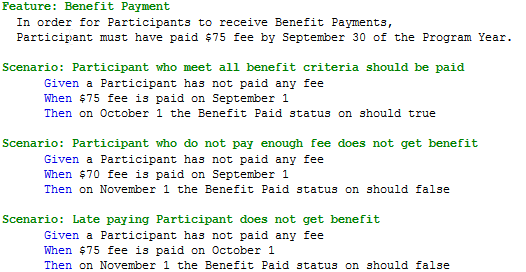
To demonstrate the capability of frameworks like Cucumber, here we show a sample behaviour artifact:

Cucumber Snippet Displaying Test Stories

Even though the language used in the “feature” specification is deceptively non-technical looking, it is in fact executable and becomes the control flow of test automations.

With the setup of tools like jUnit, each of the scenarios translates into regular unit tests that start with failing test cases, and evolve into “green” passing tests. To dive into a concrete example for the above definition of behaviour, Cucumber can be initialized as:

A Screenshot Of Code Displaying How To Initialize Cucumber

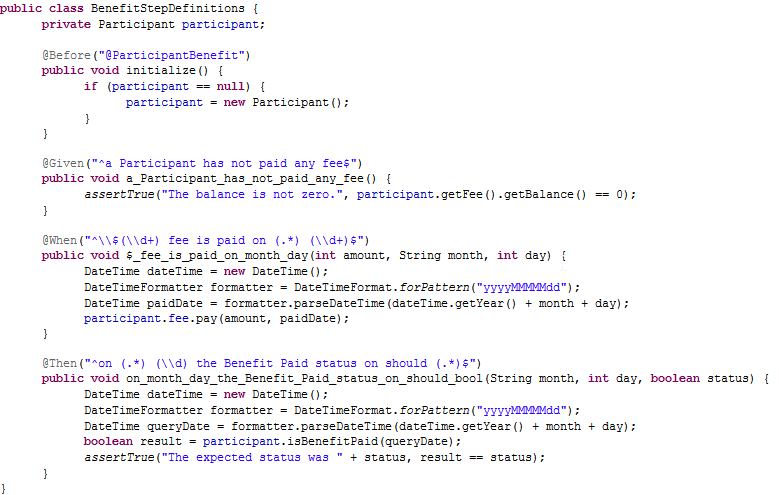
The actual “technical” aspect of the test execution is written up as:

A Screenshot Of Code Showing Example Implementation Of Cucumber

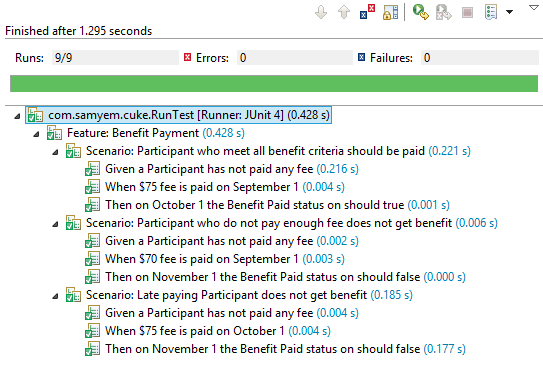
Once the implementation matches the specification, the end-goal is to end-up with a green result that apparently executes the business produced specification:

Demonstration Of All Passed Tests

As the original idea around test driven development matures with specialized tools to enforce software requirement integrity, business stakeholders worry less about their intentions being misunderstood. Developers, on the other hand, can obtain a level of confidence that they are delivering maximum value with their work. Nirvana is indeed within grasp!

References

Specification by Example: How Successful Teams Deliver the Right Software by: Gojko Adzic

MERAK 2012 Holiday Party

This year MERAK decided to stray from our traditional dinner and speeches event and celebrate the season with a little magic.

Beginning with a smooth coach ride to our hotel in Niagara Falls. A heavy fog covered the view from our rooms. As it cleared we were met with a stunning view of the Canadian “Horseshoe” Falls, American Falls & Bridal Veil Falls. What a treat especially when the spotlights bathed the Falls in different colours.

After we settling into our hotel rooms we embarked on another coach ride to the Greg Frewin Dinner Theatre. Where we were mystified by illusions of Greg Frewin and his entourage, including tigers, ducks, parrots and assistants. How did he replace the woman in a cage with a tiger???


Greg Frewin With A Parrot

It was a wonderful evening that allowed the MERAK team, friends and families to connect, relax and have fun. What a great way to celebrate the holidays.

Happy Holidays to Everyone!

Movember Adaptation: August 2012 – October 2012

James With His Hair Completely Buzzed Off

James Dyer’s mustache has had a few close calls (August, September and October); however with support from friends and colleagues he continues to sport the mustache. He is crossing his fingers it will survive until its first “Birthday” in November.

Why is there a picture of the back of James’ head? Well the mustache is now visible from either side of his head.

How to Participate?

Donations can be made to a charity of your choice, send a gift notification to [email protected].

James has recommended the Stephen Lewis Foundation, which will automatically track donations.

Thank you for your support! Keep checking back for updates and progress.

Original Story – April 2012

Follow-up Story #1 – July 2012

Movember Adaptation: May 2012 – July 2012

James Dyer continues to sport his stache through the hot summer months. With significant support back in April, James had enough financial support from pro-stachers to take his mustache through May, June and July.

July 2012

Merak On The Hall Of Fame

James reached 2 major milestones in the month of July:

  1. Over $2,000 has been raised since Movember Adaptation began
  2. July 7 marked the 250th day of mustachioed madness

The fundraising goal for August has been increased to $500. With carry-over from July into August, pro-stachers need to raise $258 to keep James’ mustache past Labour Day.

How to Participate?

Donations can be made to a charity of your choice.  James has recommended the Stephen Lewis Foundation. You can send the gift notification to [email protected]. James keeps track of the donations through that email and determine at the end of each month whether the stache stays or goes.

Thank you for your support! Keep checking back for updates and progress.

Original Story – April 2012

The Wall Of Fame