

Staying Safe During the Holidays

Episode 45

As the holiday season approaches, this year will be very different. For many families, this is a time to get together, make and share memories, and celebrate the end of the year. With COVID-19 running rampant the responsible action this holiday season will be to stay apart. While practicing physical distancing will keep our loved ones safe, it does not mean we have to socially isolate. To connect virtually this holiday season are numerous, free, and easy to use. This blog will provide an overview of popular video calling platforms: Microsoft Teams, Google Chat, and Zoom.

There are a few requirements for video calling. Access to a robust internet connection and strong Wi-Fi signal or direct ethernet connection is important as video calling does require a reasonable amount of bandwidth to work properly. This can be challenging for people who live in rural locations however if you have a 3G or better cellular connection, temporarily increasing your data plan can be money well spent if it ensures family members are safe this season. The next requirement is a device with a camera and microphone. With nearly ubiquitous smartphone use this should not be an issue, likewise tablets are inexpensive and offer larger screens. If you plan on lending an older device to a family member it is important to perform any software updates if the device has not been used in a while (and make sure to thoroughly clean the outside of the device to prevent surface transmission of viruses). And make sure to pick a comfy location with access to external power as most devices can only operate for a few hours on battery while video calling. Lastly if one is using an older laptop ensure there is good ventilation underneath as video calling will be demanding on the device (my wife’s grandma puts her old laptop on a cookie cooling rack!).

Screenshot Of A Typical Teams Digital Conference Meeting With Nine Participants

Microsoft Teams is the collaboration product that has been primarily targeted to business users, but the application is available to consumers as well. Both the desktop and mobile applications are free and just require an email to sign up. With Teams seeing a near tripling of use in 2020, Microsoft has placed a huge amount of development resources into the product, a great benefit to consumers. Video calling has no time limit, and every Microsoft account comes with bonus file storage and collaboration features. Consumers get to enjoy the robustness and security of a platform built for business users, but the interface and setup can be overwhelming for users not familiar with Microsoft products. Even current Microsoft Business users can experience frustration with the platform when switching between business and personal accounts.

Links:
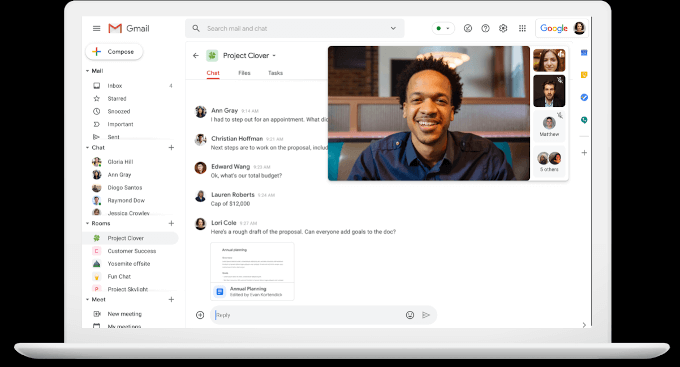
Google Meet Screen Shot.

Google Chat would be the product equivalent of Microsoft Teams with usage spanning between both business users and regular consumers. Google chat is free to use with the creation of a Gmail account. Google Chat offers text conversation and Google Meet facilitates video calls. Both are free to use with the creation of a Gmail account. Google Meet video calls have no time limit, and most internet users are likely to have a Gmail account, simplifying the product choice among families. One of the challenges is that Google is in the middle of a rebranding and migration of chat features between products. Google Chat and Meet are replacing Google Hangouts and the phase out can be confusing for users that are trying to connect but might not be synced on the same service. This was particularly challenging for our family until everyone moved off Hangouts and into Chat, and even then, the one user with an institutional Google account had to create the Chat “room” as regular users weren’t able to create a new room. Once we were all set-up, everything was easy.

Links:
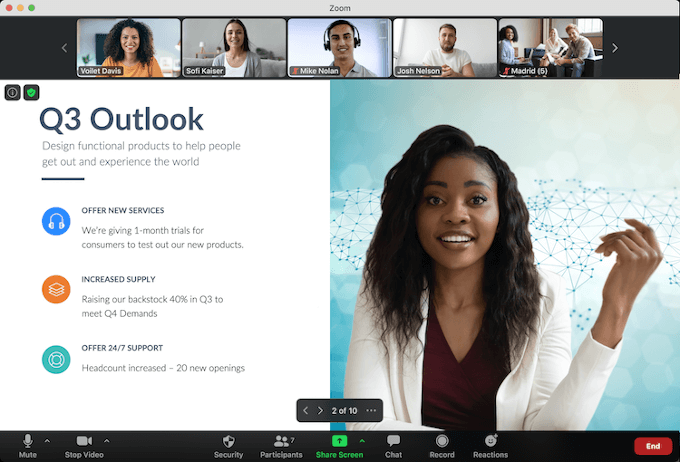
Zoom Meeting Of A Group With One Sharing A Screen With A Business Report Entitled, &Quot;Q3 Outlook&Quot;.

Lastly, I will discuss Zoom, a product that has seen a meteoric rise in popularity since the pandemic began. Massive growth and popularity have led to numerous issues regarding privacy and security, but throughout the year the product has been improved to address these issues. Zoom is free and is the easiest product to use. Due to the product’s simplicity is it very easy for malicious actors to send false links so it is very important to not blindly join meetings. Unfortunately, without a paid account the meeting limit is 40 minutes requiring users to create a new meeting after the current meeting expires.

Links:

Additional platforms that can facilitate video calls are Facebook Messenger Rooms and Apple’s Facetime.


Migrations

Episode 44

As IT technologies take an ever-greater role in managing business processes, there comes a time when applications, data, and processes require migration to satisfy the needs of the organization. Migrations can range in size from very small to massive, and in complexity from simple and easy, to terrifying. In this blog, I will provide a brief overview of the migration process.

There is a saying that “a digital transformation starts by migrating to the cloud”. While it is completely feasible for an organization to fully manage their IT needs on-premises, it is important to consider what your organizations core competencies are. In two previous blogs, I talk about digital transformations as a process of mapping the available tools to the competencies of the organization and leveraging new technologies to differentiate from competitors. Considering the scale and scope of cloud providers like Microsoft Azure and Amazon Web Services, it is not logical for most organizations to rely purely on internal resources for their technology needs. Hence for many organizations, there will come a time when migrating resources is on the table. Migration typically happens in three stages: Assessment, Migration, and Optimization.

Modern Network Shows Copper And Fiber Optic Cables With Illustrated Binary Digits (Migration Concept)

During the assessment phase, time is taken to determine what can be migrated and its current configuration, what will be impacted, and to map dependencies. From this preliminary work a migration plan is developed, highlighting findings, and laying out a roadmap for the migration. Important questions to ask are: what applications and infrastructure am I currently running?; of these applications, which should be migrated, modernized, retired, replaced, or maintained on-premises?; what are the risks associated with a migration, and how long will it take?; what will be the return on my investment for migration, based on my current running costs, my post-migration running costs, and the cost of migration itself?; and what additional benefits will cloud migration bring to my organization? Ideally it is a best practice to avoid “big bang events”, prioritizing simpler, non-critical workloads for early migration. Areas of concern are regulatory compliance, security, service availability, functionality, compatibility, performance, cost, and cost flexibility.

During the migration, some early steps include the setup of subscriptions, security policies, general governance, and verifying connectivity with newly procured services. There are five common migration approaches: Retire, Replace, Rehost, Rearchitect, and Retain. With Retire, the application is at the end of life and it is easier to retire, than migrate the application. Replace is very common where business workloads have equivalent offerings, especially now with a rich selection of Software as a Service (SaaS) products to choose from. Rehost or (also known as lift and shift) is where an application is migrated to a set of virtual machines as part of an Infrastructure as a Service (IaaS) offering from a cloud provider. Rearchitect requires converting the application to run as a Platform as a Service (PaaS), which is significantly more costly than rehosting, but can be advantageous as the upgraded application will likely have lower on-going management complexity and cost compared to rehosting. Applications are commonly rehosted, then updated to take advantage of PaaS. Lastly, Retain refers to retaining on-premises for when continuing in place is the only realistic option. This option is common for applications with regulatory or geographic requirements that cannot be met by current cloud offerings.

Brett Of Merak Systems Performs Server Maintenance

Once migration has been completed, the focus shifts to optimization. At this stage, the cloud spending is being tracked and time is spent formulating strategies for savings. If an IaaS migration was performed, an evaluation of the migrated applications for opportunities to right size provisioned virtual machines is done. The next step would be the implementation of automation to resize or stop services based on utilizations, and the identification of applications that could benefit from optimizations like moving from IaaS to PaaS.

In many ways, the migration process is never ending, as elements of the technology stack are placed into focus and assessed to discover opportunities for improvement. One could think of migrations not as a singular event, but a continuous practice that is developed over time with the core goal being the migration from a big bang change every few years to a continuous focus on refactoring in small iterations to keep the organization technology relevant.

Redefining Pair Programming

Episode 43

In a perfect world, those closest to a problem have the tools and capacity to create the solutions they need. Whether delighting customers or solving an internal challenge, those on the front lines know most intimately the needs and requirements of the project. In the actual world, the expertise to develop the solution will be at least one, but possibly many steps removed from the problem, creating translation challenges that must be overcome. A disconnect between the people with the problem and the people with the skills to solve the problem is not a new difficulty, and there have been numerous methodologies, practices, and principles developed in the pursuit of generating high quality products with the fewest amount of resources. In this blog, I will explore how Pair Programming, a method to improve development quality, can be used to bring the development talent closer to the problem.

Pair Programming is a software development practice where two developers work together at one workstation. One Developer writes code while the other watches. Ideally, their roles switch frequently. One Developer might focus more on strategic elements of the development work while the other will focus on the tactical aspects. In this practice, development time is front loaded as two developers are being utilized at a single workstation, however the solution will have fewer defects and require less rework in the future than a single Developer approach. Pair Programming is a great method for sharing and expanding skill sets between developers as two individuals will almost always have different perspectives and approaches in solving a problem. Pairings can vary between expert and expert, expert and novice, and novice and novice. With this methodology we are assuming that the development pair is at least one step removed from the problem and the development is taking guidance from a product owner or business user.

Lego Stormtroopers Holding An Egg

Last blog episode explored the potential that Citizen Developers offer to organizations as we see expanding capabilities and capacity of low-code application development platforms. The goal of these systems is to empower business users to solve their own problems, however, as covered in a previous blog, the low-code tools have their own risks. Here we can use Citizen Developers and Pair Programming to bring development talent a little closer to the problem.

Now consider replacing one Developer with a Citizen Developer. At the end of the day, using low-code platforms turns into a development project once the scope expands beyond what is solvable with simple templates. For more advanced users of these platforms, there are “for Developer” tools that unlock powerful features that would typically be out of reach of the average Citizen Developer. In this form of Pair Programming each Developer would have their own workstation, where they are each coding together as a team, and responsible for the same feature or project. The coding roles are differentiated between competency areas, with strategic and tactical aspects of both business and technical requirements shared between the pair.

An example of a problem for Pair Programming with a Citizen Developer would be automating a sales lead documentation process where the Citizen Developer creates a Power Automate Flow to summarize the details of the inquiry and post this information into a sales chat channel. The Developer then handles the API integration with the organization’s CRM system. The Citizen Developer can document the requirements while simultaneously working with the Developer to work out the best technical architecture for the solution. The Developer can experience the business requirements more intimately than they normally would and the Citizen Developer can get exposure to more technical aspects of the implementation that are outside their current technical competency.

People Working Together At A Startup Company

Just like conventional Pair programming, the team can be arranged in multiple variations depending on the characteristics of the individuals and the task ahead. The Developer can act as a lead, taking business requirements from the Citizen Developer and then planning out future development steps. The roles could also be reversed with the Citizen Developer acting as the lead. Another methodology would be that the Citizen Developer does most of the development, but a Developer is available as a mentor or to provide support on critical stages of the development process.

I fall into the category of Citizen Developer and was involved in the migration to Azure SQL of a legacy Excel application with an extensive ETL layer based on Power Query and DAX. While I’m a strong Power Query and DAX user, and had an understanding of the inner workings of the Excel application, I was fresh to SQL and SSIS. Translating the logic from the multiple Excel files would have been challenging for a Developer working solo, as the business requirements were not obviously visible within the Excel code. Likewise, the project would have been impossible for me alone, as both SQL and SSIS are far too extensive of applications to learn in a short time frame without guidance. With the help and advice of a Developer the project was successfully completed leading to a near 50x improvement in report refresh time. By the halfway point of the project, the Developer and I could fluently speak on both the business and technical requirements of the project as the Developer understood the business processes, and thanks to their help I could now work with SQL and SSIS. Pair Programming adapted to trained Developer and Citizen Developer provides an opportunity for both individuals to expand their skill sets while generating an efficient and effective solution for the problem at hand.

Competitive Advantage

Episode 42

“Competitive advantage” refers to how an organization can provide superior or cheaper produced goods and services than a competitor. Two common methods for producing a competitive advantage would be through increasing productivity or developing intellectual property.

Digital Skills + Citizen Developers + Intellectual Property = Competitive Advantage

Both increasing productivity and developing intellectual property are highly dependent on technology. While the common path for organizations would be to hire development talent to support their business users, if business users closest to the problem could do their own development then errors in translating requirements to a technology solution can be greatly reduced. This blog will argue that every organization has untapped talent that can be used to develop technology solutions for driving a competitive advantage.

What I am about to explore is not new. Business users developing their own software based solutions has been going on since at least the early 1990s, ever since personal computers were popularized and individuals had access to spreadsheet applications. For a very long time, the ultimate citizen developer tool has been a spreadsheet application. To this day there are mission critical spreadsheets managing financial reporting, payroll, plant design, and even power grid management for very large organizations. To think, your hot cup of tea this morning was because someone somewhere ran an Excel macro and made adjustments to ensure power to your home was not interrupted. Spreadsheets were built because finance professionals, accountants, engineers, and others had a problem that they could solve with the tools available. The likelihood that we have all been in an organization with an important spreadsheet or two is very high. As a result, strong spreadsheet skills have long been seen as desirable.

A natural curiosity and desire to solve problems drove some individuals to develop advanced spreadsheet skills. Much like the times, technology tools are changing. As the software industry matures, more tools and techniques that were originally exclusive to professional developers are at the fingertips of users willing to take the time to learn. These users who explore new technology and develop technical solutions to problems are commonly referred to as “Power Users”. Today, Power Users can also be referred to as “Citizen Developers”, because they are taking on tasks that would traditionally have been done by a Developer, but without a formal education in software development. A few areas that Citizen Developers can work on developing solutions for are business process automation, data analytics, application development, and A.I. services. While some could argue a spreadsheet could do all of these, even the best swiss army knife is still a swiss army knife.

Some Of The Merak Systems Team Attend Developer Meeting On Video Conferencing While One Types Code On A Laptop

So where do digital skills fit in all of this? In the days of spreadsheets, new features or enhancements would be released annually at best, or would come when your organization upgraded versions. Keeping skills relevant was largely problem dependent as the tool did not change with significant frequency. Good spreadsheet skills generally remained relevant for years (or decades, in some cases). Today, Citizen Developer tools can see updates almost daily, with significant changes over the timeframe of a few months. Continual maintenance of both skills and managed applications is critical with rapidly changing tools. Citizen Developers now need to pay closer attention to development of the tools they use since functionality of features can dramatically change between releases. Continual updates are typically for the better, but they increase the importance of staying technology relevant, since last year’s solution may not be the best choice for today.

To maximize the benefits of Citizen Development, it is important to keep the number of layers between development and the problem as few as possible. Ideally, the product owner is performing the development and is responsible for future maintenance. Development is handled iteratively, and effort is placed on determining the best methodology for taking an idea to working code in the shortest possible time. These are practices that are second nature for a developer; therefore, there could be value in having a developer act as a lead, mentor, or support for the citizen development team. I fall into the category of Citizen Developer and being able to access a trained developer for feedback or expertise has been invaluable on projects that have stretched my skill set.

Lastly, with Citizen Developers encouraged, your organization has a development pipeline for accumulating intellectual property. Over-time these tools, calculators, and applications form a library of intellectual property that can be leveraged to provide the firm with a competitive advantage. It is not uncommon for an organization to develop a tool to solve an internal problem only to realize that they struck gold with a solution that can be monetized to solve a problem for the industry and uncover an entirely new revenue channel. We all have that spreadsheet wizard in the office who is just waiting to be tapped to solve the next problem, giving them the flexibility to explore, experiment, and develop awesome new solutions for your organization!

Chat-based Organizations

Episode 41

It is Monday morning; a weekend has passed where you were fortunate enough to not have to check your email for two whole days. The reprieve is now met with dread as you stare at the 200+ unread emails. A few hours later, the list has been parsed, a few quick responses sent, and now you can start your day…after addressing the 30 new emails that have newly appeared. It is a situation that is all too familiar. Organizational agility suffers when the primary means of communication and collaboration is done through the wrong communication medium. The means of communication must be multifaceted to match the numerous needs of an organization. Reliance on a single tool like email is the equivalent of a golfer hitting the course with only their drivers. This blog will cover how email, text chat, and video can be more effectively used, like a golfer bringing all the clubs they need to stay under par.

Golf Driving From The Tee Close-Up

Emails are best thought of as your long game. The hole may or may not be visible, but you know the direction to go. It is possible to see some obstacles, but their full nature is hard to determine from where you are currently standing. Shots from the tee-box are high impact but do not have the fidelity compared to using an iron or putter. This is the golf equivalent of an email. Ideally, a one-way, a written body of information, intended to pass along high-level details to one or many parties. Due to the extremely low information through-put of email, back and forth exchange is not productive. Tee-off shots are critical for setting up the remaining hits for a successful under par hole. Likewise, emails require care and attention to ensure that follow up discussions by other mediums are successful. A bad tee-off leaves the golfer a long way from the fairway, with multiple follow up shots used to correct the error. The same is true with a poorly constructed email. We have all been stuck on that RE:RE:RE:RE:RE:RE:RE:RE:RE:RE email chain which long ago derailed as a few individuals debated back and forth on the best way to proceed.

Golfer Hitting Ball In Sand Pit

Ok, you made the tee-off shot, and with some good fortune we are on the fairway. We can see around the trees we shot over, the sand trap that was missed, and the flag is now in sight. The green is up on a hill, so it is hard to know exactly the slope and the risk if we overshoot. But by putting away the driver and taking out an iron, we now have far more control over our next shot. If we are short or long it is far easier to correct compared to a missed shot from tee-off, and certainly the distance to the hole will be shorter after this next shot. Getting to the green is the equivalent of using text chat. We have more clarity on our goal, obstacles are known and visible, and now we need a medium with a higher throughput for idea exchange. Chats are great for throwing out ideas, asking for quick input or details, and do not require the same degree of forethought or formality of an email. Most chat platforms will support gifs, and honestly, I have not found anyone that does not appreciate a good cat gif. At the same time, chat is limited by the speed of information that can be typed and interpreted between two individuals or a group involved in the discussion. Additionally, if chats do become extended, text is a poor medium for explaining context compared to speech. It is like using your iron on the green. An active text discussion, which can be especially bad in group chats, can lead to notification exhaustion, non-followers being needlessly distracted, or individuals learning to avoid text chat in preference of just email or meetings.

Golfer Putting On The Green

So close now, we are on the green. The hole is 15 feet away. Every bump and contour are visible, details like this were irrelevant earlier as the tools used to get here lacked the accuracy. To get this next shot perfect, every detail between where you are now, and the hole is a factor to consider. This is when a discussion requires a deeper understanding of context than what an email or text chat conversation can facilitate in a reasonable period. In the age of remote work, this is where video calls shine. At least until we have a reliable brain machine interface, speech and body language is the highest throughput medium we have for individuals to exchange information. Just like we would not use a driver or iron on the green, we do not use the putter at tee-off. Ever walk away from a meeting that accomplished nothing? For a meeting, everyone is required to be present, and in the moment, where with email and text chat, it is only a requirement for the author as the recipients can take the time to digest before responding. A useless meeting is the discussion of the small three-inch-deep six-inch-wide divot two feet from sand-trap #3 about 150 yards from the tee-off to the right of the fairway after the water hazard. For a great meeting to take place, the team needs to work through the course together using the right tools, matching the throughput and context requirements of each exchange on the journey.

Just using email and meetings takes away from the value that can be applied while still on the fairway. Quick check-ins, or information requests, allow organizations to quickly share necessary information to remain agile and relevant. While a quick email might seem like not a big deal, conversational emails often lead to inbox hell, lowering the potential value when compared to using email more strategically. Too heavy of a reliance on chat, can lead to an overpopulation of cute cat gifs that result in excessive distractions and a reduced velocity of information exchange as context takes much longer to communicate through text than voice. Over-reliance on meetings drops groups into discussions of details that might not be relevant for the task at hand, potentially wasting valuable time.

Dizzying Pace of AI

Episode 40

Machine Learning (ML) and Artificial Intelligence (AI) systems are growing in capacity at a dizzying pace. The speed of artificial intelligence computation doubles every three months! The time required to train a network for supervised image recognition fell from three hours in October 2017 to about 88 seconds in July 2019. Pure computational power is only one element in this equation, the efficiency in training is also improving at an exponential rate. It has been estimated that algorithmic efficiency doubles every 16 months. The three core inputs for ML performance are computation, algorithm efficiency, and data. Data has been doubling every 2 years! McKinsey Digital estimates that 127 devices hook up to the internet every second. Is your head spinning yet?

Large Contemporary Open Warehouse With Full And Tall Racking

Business applications encode user logic and judgement to streamline or automate processes that would have otherwise been done manually. Most administrative workflows are in a structure that resembles “if this then that”. If a customer places an order, then create a pick sheet for the warehouse, create ledger entries for accounting, and notify purchasing for replenishment. Under ideal circumstances, simple business rules can cover most situations, however, the value that a human provides is the ability to reason over the exceptions. What if the customer returns the product with missing pieces? What if there is a warranty claim? What to do if our supplier has put our latest replenishment request on backorder? These exceptions can be encapsulated into a business application, however creating solutions for every exception using the “if this then that” logic will accumulate to a point where the cost to maintain a system will outweigh the benefit. Where ML and AI is different is that these tools can reason over environments and datasets beyond human comprehension or capacity, for instance navigation planning and route recommendations. ML and AI systems have revolutionized our ability to reason over complex systems, but the real game changer is that these systems are exponentially improving in areas that are distinctly human: vision and language.

For a machine to replicate a task, the logic either needs to be hard coded by experts or learned through various training techniques. For tasks beyond current human capacity, any improvement beyond the current state of practice is a win. With the exponential pace of development, once parity is reached, the performance is surpassed by an order of magnitude in only a few years. The time gap between a machine beating the best chess player (1997) and beating the best Go player (2017) was almost 20 years. Since Ke Jie’s defeat at Go, the same research team have moved orders of magnitude beyond the threshold to beat a world class Go player, and regularly smash humans at other competitive games. What does this all mean to us non-academic types? We are reaching a state where ML and AI are getting close to parity in vision and language tasks that humans take for granted. This will have a massive impact on the systems that currently encode the business processes we use as ML and AI solutions will not only be able to handle the standard “if this then that” logic that is currently in place, but also learn to handle the exceptions that humans are required for. Since development improves exponentially, reaching parity may feel like a long way away, until it is not, and then in a short window of time, the talents of a ML and AI system will far exceed anything currently in place.

Star System Type Concept Of Ai In A Printed Circuit Pattern.

Running from September 22nd to 24th, 2020, Microsoft hosted its annual Ignite Conference showcasing the vision, direction, and development plans for all the products and services within its ecosystem. One thing that stood out for me this year was that nearly every talk had mentioned AI in some capacity. If one were to play a drinking game for every time ML or AI was mentioned, it would have been one crazy three-day bender. What I have seen in the last 3 years is that these tools have moved from a research curiosity, to a narrow scope solution, to invisible and ubiquitous in shortening intervals. Technology demos are preview features in a few months, then deployed as a full feature or service in a year. With progress moving at an exponential pace, small improvements in capability can have a massive impact. Further the impact gets multiplied by combinatorial effects as separate solutions are merged in innovative ways to further provide value. For instance, a chat bot capable of natural language processing of either a text or voice conversation is an amazing accomplishment, however, alone it is not very useful, but when paired with a recommendation engine the possibilities are endless. Whether helping a customer design their dream kitchen, or provide health advice, the combination of two narrow solutions offers a greatly expanded set of possibilities. It is only a matter of time before your face can be used for the leading role of the next Black Mirror season (or really any of your favorite video media).

If the exponential development of ML and AI systems feels overwhelming to you, that feeling is not wrong. Keeping up is increasingly difficult, however, this brave new world is a place we all find ourselves in. Many tools are being built without the full understanding of the total future capacity to provide value. This means as ML and AI solutions continue exploding in capacity and those curious to explore the possibilities are welcomed to an exponentially expanding space of opportunity.

Existential Threats

Episode 39

In business speak, existential threats are the external factors that threaten the future continuance of the organization. If we consider business lifecycle stages of start-up, growth, market capture, market dominance, decline, and replacement, there is a point when the culture of the organization becomes comfortable, resulting in a slow loss of the energy and innovation that made the organization initially successful. Early stage organizations face numerous existential threats and therefore it is baked into their DNA that they need to adapt to survive. While not a discussion on one’s purpose in the universe, this blog will focus on how culture and strategic planning impact an organization’s perception of existential threats and its ability to provide market value.

A few examples that stick in my mind when considering this topic is the fossil fuel industry, Netflix versus Blockbuster, and AMD sweeping CPU market share from Intel. Economic and environmental threats have been contributors to energy multi-nationals no longer ranking as the world’s most valuable companies. Technological change utilized by Netflix was the undoing of Blockbuster. Intel has fallen behind as their pace of innovation declined after many years being the clear winner, giving an opportunity for AMD to leapfrog Intel with superior products. “We are the only shop in town,” until you are not. “We are the best in our industry,” until you are not. “Our customers love us,” until they find a better alternative. Being the best is a moving target and resting on success will only allow your organization to drift away from its peak potential, and if unaddressed for too long one is left with a crisis. An existential crisis is a strong motivator, but not a good one. Understanding your organization’s external environment is critical, but how your organization perceives these threats is additionally important.

A Large Crater From A Meteor

Public institutions are especially vulnerable to existential threats because, in some situations, the users of their services have no alternatives. There are no Yelp reviews for public services, and no amount of 1-star reviews will allow a Canadian Citizen to file a tax return with anyone other than the CRA. If you cannot vote with your dollars you can vote with your feet, citizens can move if they are dissatisfied with the services being provided. When considering public services, the municipal level has the most skin in the game as individuals can move to the next city over with far less hassle than changing regions or immigrating to a new country.

It is important to note that digital professionals, who are typically well paid, can work from wherever they are, which means some demographics can be more sensitive to the services provided by the public institutions in their area. However, this should not come too much of a surprise as people tend to pick neighbourhoods with good schools, low crime, and favourable job opportunities. What is changing is that with a highly mobile and global workforce, the consideration done by individuals now extends beyond local into regional and international contexts. If your State/Province was not considering these macro forces in play, the problem will not become visible until it is too late. We can already see this as people leave California for other states in the US.

Existential threats are strategic issues, and therefore require your leadership team to continuously communicate the organization’s strategic goals and help to shape a culture that avoids getting too comfortable being the best or only option available. For private organizations this is challenging as it is far easier to set a goal against a known and confirmed target, which is hard if you are leading or have few competitors. A common strategy is to formulate a mission that is hugely aspirational to work towards, that way your benchmark is no longer your industry, but your past self. For public institutions, the challenges lie in how the culture perceives its external environment. If “this is how we have always done it” is a dominant response to external challenges, consider this a red flag to explore. Ultimately, existential threats shape organizations to be their best, however when they are conquered the success can be a threat too.

Fear of Learning Something New

Episode 38

A popular theory in management studies is that to encourage a workplace culture where employees are highly motivated they need the ability to practice autonomy, mastery, and purpose. The idea originates in Daniel H. Pink’s book, “Drive: The surprising truth about what motivates us”, published in 2009. Autonomy is our desire to be self-directed, mastery is the urge to get better skills, and purpose is the desire to do something that has meaning and is important. For this blog I am going to explore mastery. It is very important to note Pink’s definition of mastery as the urge to get better skills. This definition contrasts with a common view of the term mastery, to possess or display great skill or knowledge in an area. I will argue that pursuing mastery is rewarding, however once mastery is attained, starting something new can be a great source of fear and anxiety.

There is a common notion that mastery is just a function of input time, where roughly 10000 hours is the magic number to achieve mastery. This represents a massive time investment requiring dedication, grit, and sacrifice. It is no surprise that mastery under these conditions would feel rewarding. In modern careers, mastery can exist in many forms. Individuals specializing in a subject by completing a masters or PhD will have invested the time to become subject matter experts on a specific area of knowledge. Long serving employees retain a huge amount of contextual information on the nuances of their role, technical and business environments. We want to feel valued and it feels great to be known as the go to resource for a problem. A term that has stuck with me for this type of mastery is “ice-pick experts”.

Two Arrows Hit The Bullseye On An Orange And Blue Target

Herein lies a potential trap for ice-pick experts. The need for knowledge experts is critical, but at the same time business velocity is very high. The “steady” state for business today is chasing a set of moving expectations. The need for business agility has been the motivation behind corporate strategies that focus on driving business innovation. Focused skill growth does plateau and there is a false sense of completeness being an ice-pick expert. “I know everything I need to know”. While this might be true for a specific problem, all that knowledge and investment can become irrelevant as business needs shift. Starting over and relinquishing the valued status of expert is painful, so it would not come as a surprise that individuals in this situation would be hesitant to start something new. Or worse, ice-pick experts in leadership roles holding back business innovation as the new practices require domain knowledge outside the individual’s current understanding. Knowledge obsolescence is especially common in the technology sector which creates challenges as expert knowledge can become as much a liability as it is valued under the right circumstances. “This is how we have always done it” should raise eyebrows.

Modern businesses are faced with an endless stream of new problems to solve. Just like how business must continuously question its practices and processes, look inward and ask yourself “what better skills should I acquire?” Businesses use moonshots, big hairy goals, and stretch goals, to ensure expectations never settle. Apply these practices to yourself. Learning can be fun and rewarding. Instead of viewing mastery as the goal, celebrate the acquisition of competency. This results in more wins more often, with the process self-reinforcing: easier to reflect on progress, and more difficult to become complacent. To get a handle on what you know you do not know, build a personal learning roadmap, and then prioritize gaps. Channel natural curiosity if you have it, and then ritualize it if you can. What you will find over time is that a different form of mastery develops, a mastery of rapidly gaining competence in a new area.

Become an expert in a few areas and good enough to be dangerous in many. Instead of striving to be an ice-pick, envision your expertise as the letter “E”. Unlock serendipity as over time it becomes easier to inter-relate ideas or practices across disciplines. Do not be mentally limited by what your formal education provides. Do not be afraid to go back to school if formal education works for you. If you learned something once, you have the capacity to learn something else. Every profession has its own rabbit hole, and starting can be intimidating, but just like mastery in a single profession, continuous learning is a daily practice. To eat an elephant, it is one bite at a time.

Hiker Standing On Top Of Mountain

I do not view myself formally as a developer or programmer. Coding languages were intimidating as my formal education provided limited exposure. Since joining MERAK, I have become competent at working with SQL and SSIS and feel confident considering myself an expert in Power Query and DAX. Previously SQL was a black magic box that I used to restore a database backup once after some difficulty, and Power Query was used to make simple API calls with limited transformations. I have always viewed myself as an Excel wizard, but at a Microsoft conference in late 2018, I realized how out of date my skills were and decided to do something about it.

Using a personal passion project as the foundation to a learning roadmap, I distinctly remember saying to a colleague early into this journey, “to solve this problem, I need to use something called DAX”. Recalling my naivety at the time is a rewarding feeling today, as I can distinctly see the progress over the last couple years. Bit by bit, problem by problem, competencies are gained. The most revealing moment has been conversing with experts in these areas with questions and learning that despite their status, they are in the same situation as everyone else, learning as they go, bit by bit, solving one problem after another.

Impostor Syndrome

Episode 37

Impostor Syndrome is a psychological pattern in which an individual doubts their accomplishments or talents and has a persistent internalized fear of being exposed as a fraud. Often our top performers, most worthy of praise, suffer from this condition. While impostor syndrome is an individual’s battle, in a modern workplace, its management and hopeful defeat can be done collectively. This blog will cover how corporate culture can help individuals who suffer from impostor syndrome.

Impostors syndrome can manifest in several ways: the need to be special or the best; to exemplify characteristics of a super person; a fear of failure; denial of their ability and discounting praise; or the feelings of fear and guilt about success. Modern work environments have features that make it easy for individuals that suffer from impostor syndrome to get stuck in feedback loops, making the condition worse if left unaddressed. In modern work environments we rely heavily on knowledge from experts and specialists working within teams that tackle complex problems often greater than any single individual. Compounding this the modern work environment is dynamic, with systems and processes changing more rapidly than they have in the past.

A Family Of Meerkats Stand Together With A Domestic Orange Tabby In Their Midst As An Imposter

The combination of individual specialization, multi-role teams, and a dynamic external environment places a lot of pressure on individuals to perform at high levels, as their contributions are critical to a high performing team. Therefore, individuals that suffer from impostor syndrome, who often doubt their own abilities, will either compensate by putting in extraordinary effort or fear contributing, amplifying their anxiety. We have all been in projects where an individual carried or saved the team or had someone in the office who is challenged when working on project teams.

What can you do to help individuals in your organization that suffer from imposter’s syndrome? An inclusive, supportive, and generative culture is critical here. Let’s translate those fancy buzzwords. To tackle impostor syndrome, the critical first step is to get those feelings out. If no one knows the internal challenges of the sufferer, it is impossible for others in the organization to adjust their behavior and provide support. People who feel like they are impostors often feel like they are outsiders, and therefore an inclusive culture is important. Make it normal for individuals to not be expected to know all the answers all the time. It is normal to ask for help and failure is ok. A supportive organization will see each unknown as a challenge to collectively solve (instead of sticking with what is known) and every setback as an opportunity to improve (instead of finding someone to blame). All of the above elements represent a generative culture where information and knowledge are free flowing between hierarchies and divisions, risks are shared, collaboration is encouraged, and novelty is supported.

Digital Skilling

Episode 36

In the knowledge economy, there is an unsatiated demand for high skill individuals. Traditionally, education and skill development over one’s career would focus on specialization in a key area (usually beginning and ending with post secondary education), and this would be the differentiator that would provide value for not only the individual but also the employer. The accelerating pace of change is beginning to upend this model, as technology is looking to augment (or, in some narrow cases, fully replace) professions. I am all for using technology to replace mundane and repetitive tasks to free up time and energy, leaving more time to be focused on problems that require more creative skills, however, to remain technology relevant, digital workers must remain knowledge relevant. What does that look like? For this blog, I will focus on the impacts within the business application space.

It is entirely possible over the course of a career that one’s profession will be re-written multiple times. From paper, to spreadsheets, to apps, to A.I., even within my short career I have seen an increasing ramp up in the pace of change. Remember the mobile revolution? It is only a decade or so old. While the outcomes we work for may not change too dramatically, how the work is accomplished is likely to change. We can see this most strikingly through the current revolution in advanced automation and analytics, which is becoming ubiquitous within businesses and is no longer only available to large organizations.

Illustrated Lightbulb With Business Concept Ideas Floating Outward

Currently, platforms are dominating the business application space. Combining ease of integration and flexibility of SaaS has revolutionized our workflows. Yes, there is an app for that, and yes it can share its data with other solutions within the same platform. The challenge is first learning how to proficiently use these applications, and then secondly, keeping up with their development. No longer are we refreshing versions every few years, updates now roll out on weekly and monthly schedules. Anyone using Microsoft Teams this year has experienced the fevered pace of change. This ecosystem presents an opportunity for growth, as being proficient with these applications is valuable and could be considered equivalent to having good Excel skills a decade ago.

Sadly, post secondary education is poorly equipped to educate students for this new reality. While students can develop good research, communication, and problem-solving skills through their education, the curriculum cannot be written quickly enough to keep up with industry relevant applications. An industry veteran will lose skill relevance quickly if they stop practicing. It is not the fault of Universities or Colleges, nor the instructors, but the structural differences between the educational institution and the market.

What can be done? It is my opinion that skill quality and diversity will gain more favour over time. Multiple years of experience performing a task that can be learned in a few months represents a lost opportunity. Take an automobile mechanic that spent four years changing tires and very little else. While extremely proficient at this task, if a machine can perform the same role, the mechanic has little else to fall back on, representing both a loss for the individual as well as the employer. Now consider white collar roles: numerous administrative tasks are the equivalent of a mechanic changing tires. Learning new skills is the educational equivalent of paying down technical debt in a development project. If a market change renders a skill obsolete both the employee and the employer must react to a reskilling need. Failing to do so would result in a higher price to pay tomorrow, than if reskilling and learning was part of a regular practice.

Mechanic Lies Under A 1960S Volkswagen Beetle In A Garage

There are numerous ways to gain new skills: all it takes is internet access and some motivation. Online courses are far more responsive to market changes, and endless instructional videos on nearly any topic can be found, and forums offer great troubleshooting resources. Likewise, the internet has enabled communities of practice to find each other. Whether you are a strategy/data nut like me, an office administrator, project lead, operations manager, or need help with knitting short rows to shape the perfect sock heel, one can easily find others with similar interest to learn from.

The knowledge economy demands a professional learner. Thanks to automation, more work will shift toward creative tasks and we will be faced with situations where the solution or road ahead is unknown. Being able to quickly gain proficiency in a new area will be invaluable. Likewise, mastery is fleeting as by the time a task can be mastered, its market relevance might be fading. Curiosity is essential, but not everyone in their current role can pursue learning tasks. This is where I suggest baking in learning opportunities into your hobbies through passion projects. Find a problem that you do not know the exact solution and to start tackling it. Once the problem is solved, move onto the next, or solve it again using a different approach. Examples could be using low code applications to task grocery needs at home, sending reminders for approvals at the office, or a checklist/approval request for employees entering the workspace safely during this pandemic.